EmailsDaily vs Superhuman, Fyxer, SaneBox, Shortwave & Inbox Zero: Which AI Email Tool Is Right for You?
Most AI email tools sort your inbox into their fixed categories and charge $30 a month for it. EmailsDaily sorts email into categories you describe in plain English, starting free. Here is a straight comparison so you can pick the right tool, even if it is not ours.
Free plan available. Works with Gmail and Outlook.
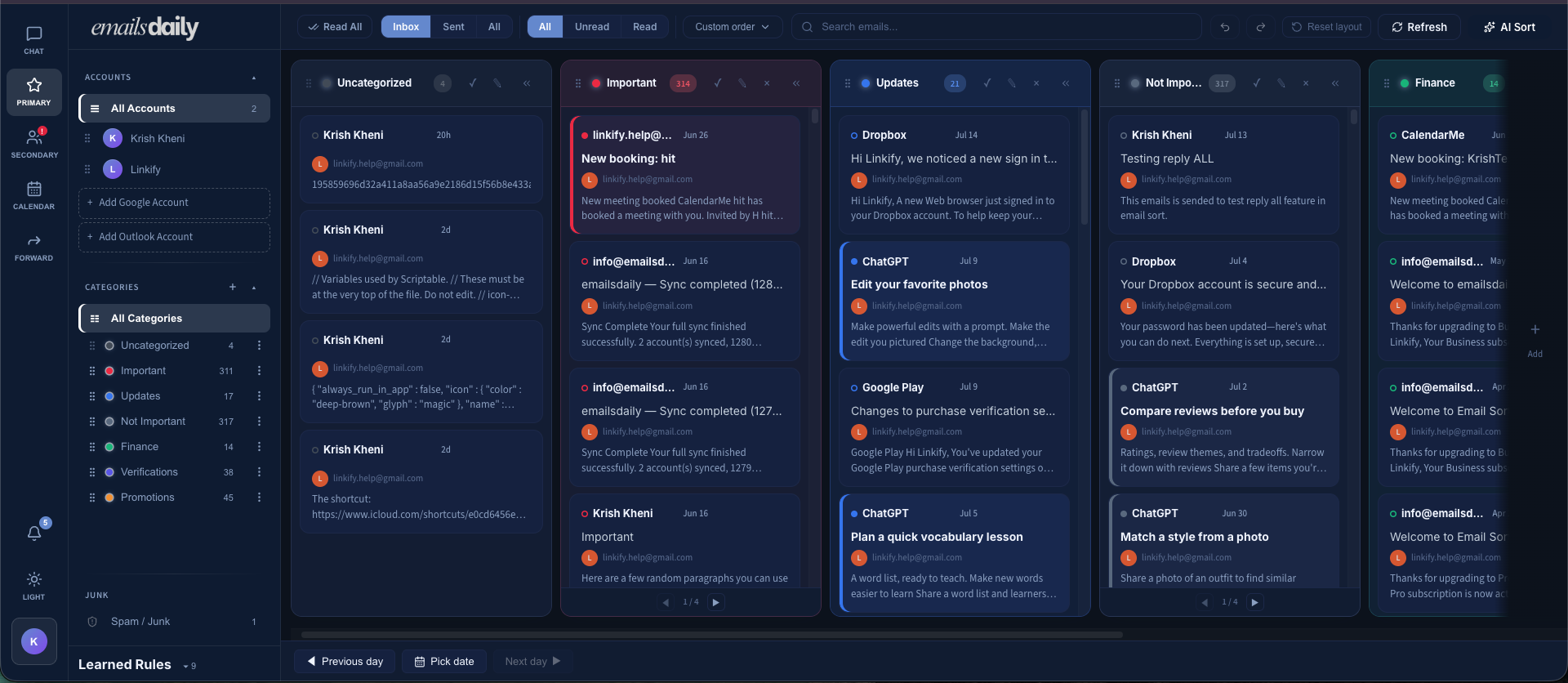
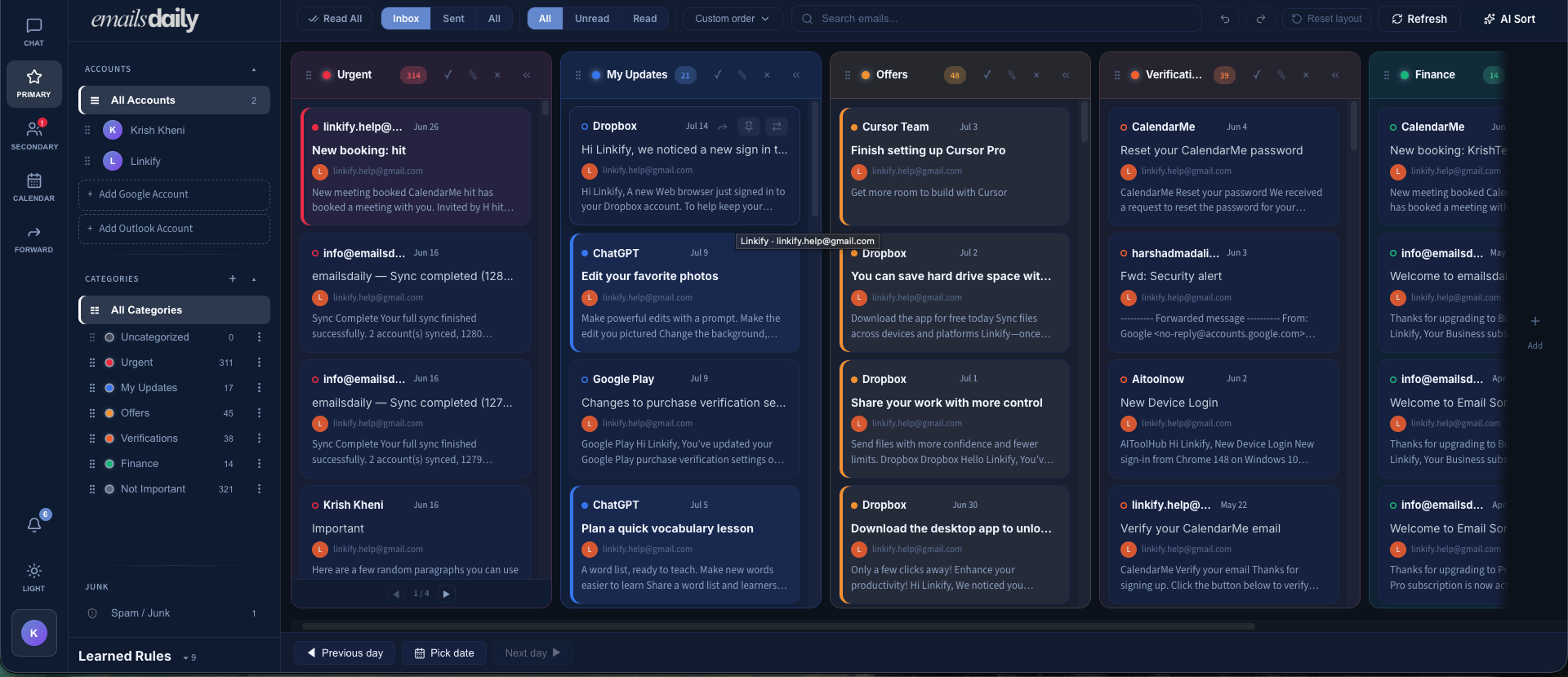
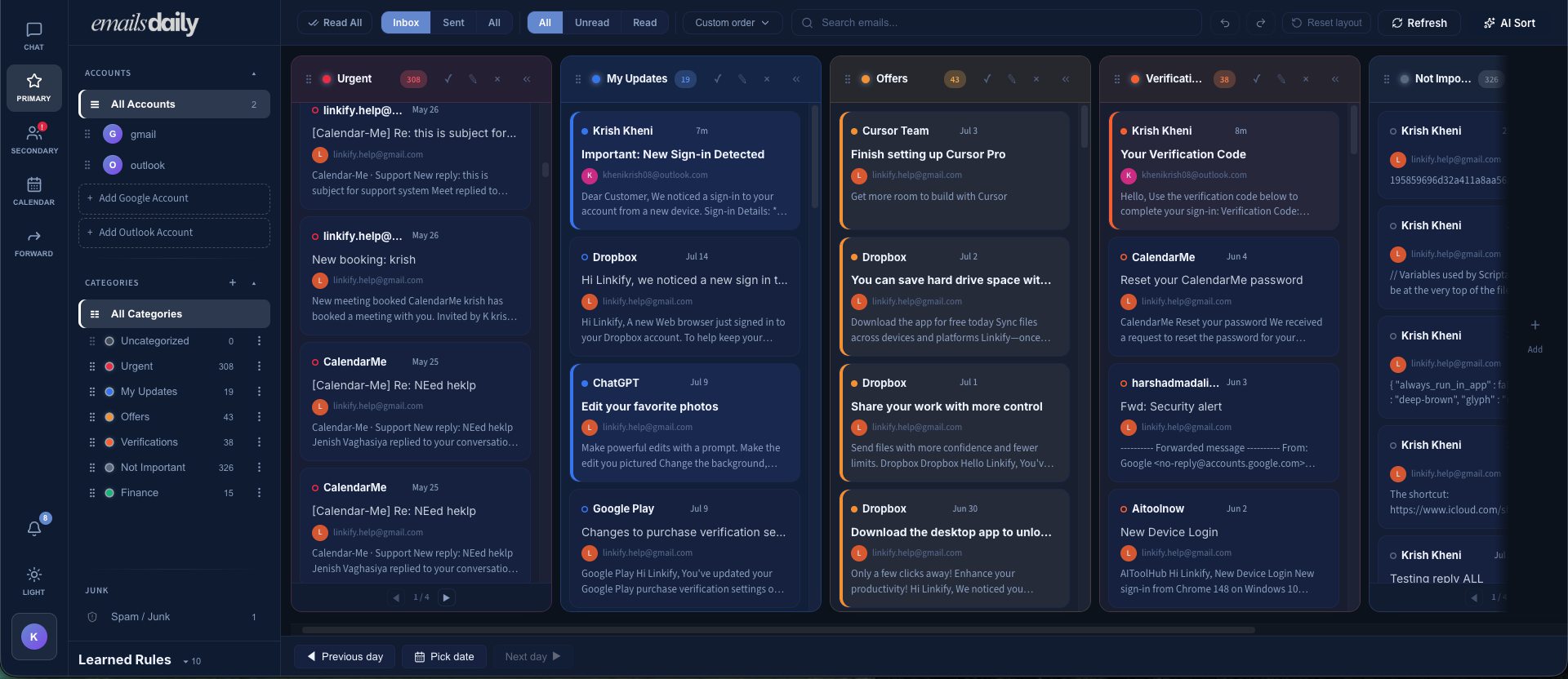
Choose Superhuman for speed and keyboard-first email at a premium price; Fyxer for AI reply drafting with a meeting notetaker; SaneBox for simple rule-based filtering on any email provider; Shortwave if you are all-in on Gmail; Inbox Zero for an open-source assistant with drafting. Or choose EmailsDaily if you want all of the above in one place: fast AI triage, reply drafting, categories you define yourself in plain English, and full Gmail and Outlook support, at a fraction of the price (free plan; Pro $9/mo).
Why compare these six tools?
Every tool on this page attacks the same problem: too much email, too little signal. They differ in how they sort, what they cost, and which providers they support. EmailsDaily's position in this market is deliberate: we do AI triage, we do it with categories you write in plain English instead of presets someone else chose, and we price it so a freelancer can afford it, not just a funded sales team. We built this page with sourced pricing and feature data so you can decide in five minutes.
How the features stack up
| Feature | EmailsDaily | Superhuman | Fyxer | SaneBox | Shortwave | Inbox Zero |
|---|---|---|---|---|---|---|
| AI auto-categorization | Custom, plain-English categories | Auto Labels (Business tier) | Fixed presets (To Respond, FYI, Marketing) | Behavior-based filtering (SaneLater), not generative AI | AI labels and filters | Default or custom categories |
| AI sorting and prioritization | Yes | Split Inbox | Yes | Yes | Yes | Yes |
| AI email summaries | Yes | Yes | Attachment summaries on Pro | No generative AI | Yes | Yes |
| Email digests / daily summary | Yes | Yes | No | Daily Digest | No | Plus tier |
| Unified inbox, Gmail + Outlook | Both providers, single view | No | No | No | Gmail only | No |
| Multiple accounts | Yes | Yes | Pro tier only | Plan-based, 1 to 4 accounts | Gmail accounts | Plus: 2 per user |
| AI reply drafting | Yes | Auto | Core feature | No | Yes | Drafts in your voice |
| Search / find important email | Inbox assistant | Ask AI (Business) | Chat assistant (Pro) | Basic | AI search, category strength | Yes |
| Inbox cleanup / unsubscribe | No bulk unsubscribe | No bulk unsubscribe | No | Yes | No | Bulk unsubscribe, cold email blocker |
| Automation / custom rules | Custom categories in plain English | Snippets, Split Inbox | Limited, higher tiers | Rule-based folders | AI filters, workflows | Plain-English rules |
| Scheduling / reminders | [Verify] | Reminders, send later | Meeting scheduling | Reminders, snooze | Snooze, reminders | Pre-meeting briefings |
| Analytics and insights | [Verify] | Read statuses etc. | Enterprise only | Digest reporting | [Verify] | Email analytics |
| Replaces your email client? | Web app you can use alongside both | Full client | Layer | Layer | Full client, Gmail | Layer |
| Free tier | Yes | Trial only | 7-day trial | 14-day trial | Reports conflict, verify | 7-day trial, self-host free |
| Entry paid price / user / mo | $9 (Pro) | $30 ($25 annual) | $30 ($22.50 annual) | $7 (Snack) | ~$14 (Pro) | $18 (annual billing) |
| Feature | EmailsDaily | Superhuman | Fyxer |
|---|---|---|---|
| AI auto-categorization | Custom, plain-English categories | Auto Labels (Business tier) | Fixed presets (To Respond, FYI, Marketing) |
| AI sorting and prioritization | Yes | Split Inbox | Yes |
| AI email summaries | Yes | Yes | Attachment summaries on Pro |
| Email digests / daily summary | Yes | Yes | No |
| Unified inbox, Gmail + Outlook | Both providers, single view | No | No |
| Multiple accounts | Yes | Yes | Pro tier only |
| AI reply drafting | Yes | Auto | Core feature |
| Search / find important email | Inbox assistant | Ask AI (Business) | Chat assistant (Pro) |
| Inbox cleanup / unsubscribe | No bulk unsubscribe | No bulk unsubscribe | No |
| Automation / custom rules | Custom categories in plain English | Snippets, Split Inbox | Limited, higher tiers |
| Scheduling / reminders | [Verify] | Reminders, send later | Meeting scheduling |
| Analytics and insights | [Verify] | Read statuses etc. | Enterprise only |
| Replaces your email client? | Web app you can use alongside both | Full client | Layer |
| Free tier | Yes | Trial only | 7-day trial |
| Entry paid price / user / mo | $9 (Pro) | $30 ($25 annual) | $30 ($22.50 annual) |
See your inbox organized by what matters.
Connect Gmail or Outlook and create your first plain-language categories.
EmailsDaily vs Superhuman
Superhuman is the premium benchmark: a full replacement email client built around speed, keyboard shortcuts, and a curated onboarding. It supports Gmail and Outlook and, since its acquisition by Grammarly's parent, sells as part of a wider suite. It is genuinely fast, and it is priced like it.
Where Superhuman is strong
- Polished, keyboard-first client widely regarded as the fastest email experience
- Gmail and Outlook support with mature iOS and Android apps
- Business tier adds Auto Drafts, Ask AI, custom Auto Labels, and CRM integrations (HubSpot, Salesforce, Pipedrive)
Where Superhuman falls short
- No free tier at all; entry is $30/user/month
- The headline AI features (Auto Drafts, Ask AI, Auto Labels) sit on the $40 Business tier, not Starter
- It is a full client switch: you adopt a new app and its workflow, not a layer over the inbox you already use
- No unified inbox
Starter $30/user/mo ($25/mo billed annually, $300/yr). Business $40/user/mo ($33/mo billed annually, $396/yr). Enterprise custom. No free plan.
Choose Superhuman if…
You live in email for hours daily, want the fastest possible client, and the subscription is a business expense you will not question.
Choose EmailsDaily if…
You want AI triage without changing email clients, you want a unified inbox, you want to define your own categories instead of configuring Split Inbox, or $360 plus per year for email is simply not defensible. EmailsDaily Pro is $9/mo, roughly a third of Superhuman's entry price, and there is a free plan to start.
EmailsDaily vs Fyxer
Fyxer is an AI executive assistant for Gmail and Outlook: it sorts email into preset categories, drafts replies trained on your past messages, and sends a notetaker into your meetings. It is the closest competitor to EmailsDaily in category, and the clearest illustration of the custom-categories difference.
Where Fyxer is strong
- Reply drafts that learn your tone from roughly your last 300 emails
- Bundled AI meeting notetaker, which can replace a separate transcription subscription
- Strong compliance posture: SOC 2 Type II and ISO/IEC 27001 are advertised, with HIPAA for enterprise
Where Fyxer falls short
- Categories are fixed presets (To Respond, FYI, Marketing, Notifications); you organize your inbox Fyxer's way, not yours
- Starter is limited to one inbox; multiple inboxes require the $50/mo Professional tier
- Third-party reviews report inconsistent categorization and no mobile app; verify current status before publishing
Starter $30/user/mo ($22.50/mo billed annually), one inbox. Professional $50/user/mo ($37.50/mo annually), multiple inboxes plus HubSpot. Enterprise custom, reported 50-seat minimum. 7-day free trial, no free tier.
Choose Fyxer if…
You mainly want AI-drafted replies and meeting notes, and preset categories are good enough.
Choose EmailsDaily if…
The categories themselves are the point. EmailsDaily lets you write your own in plain English ("invoices from clients," "newsletters I actually read") instead of adopting four presets, and at $9/mo it undercuts Fyxer's entry price by more than 3x. EmailsDaily also drafts replies, though Fyxer's tone-matched drafting and bundled meeting notetaker are more developed; if those are your top priority, Fyxer's core feature set is built for exactly that.
EmailsDaily vs SaneBox
SaneBox is the veteran: filtering that watches which senders you engage with and routes low-priority email into folders like SaneLater. It works with essentially any email provider over IMAP. It is dependable and cheap to start, but it is behavior-rule filtering, not generative AI, and it will never read the content of a request like "file every invoice" the way an LLM-based sorter can.
Where SaneBox is strong
- Works with virtually any provider (Gmail, Outlook, iCloud, IMAP), not just the big two
- Cheapest entry point on this page at $7/mo
- Mature, focused feature set: SaneLater, SaneBlackHole for permanent sender removal, Daily Digest, reminders, snooze
Where SaneBox falls short
- Not generative AI: no content understanding, no summaries, no drafting; it learns from opens and replies, so new sender types are mis-sorted until trained
- Feature-count gating is fiddly: Snack picks 2 features, Lunch picks 6, only Dinner ($36/mo) unlocks everything
- Folder-based sorting means checking multiple folders rather than one prioritized inbox
Snack $7/mo (1 account, 2 features). Lunch $12/mo (2 accounts, 6 features). Dinner $36/mo (4 accounts, all features). Annual billing saves roughly 20 to 31%, depending on plan. 14-day free trial, no free tier.
Choose SaneBox if…
You use a niche email provider, or you want simple set-and-forget filtering with no AI reading your mail.
Choose EmailsDaily if…
You want sorting that understands what emails say, not just who sent them, with categories you define in plain English. EmailsDaily's free plan also undercuts SaneBox's $7 entry, and full capability does not require a $36/mo top tier.
EmailsDaily vs Shortwave
Shortwave is an AI-native email client built by former Google Inbox engineers, with the best AI search in this category and strong summarization and drafting. It has one hard wall: it is Gmail and Google Workspace only. If any part of your work runs on Outlook or Microsoft 365, Shortwave is not an option at all.
Where Shortwave is strong
- Standout natural-language AI search across years of email history
- Full AI feature set: summaries, drafting, filters, snooze, todo-style workflows
- Polished apps on web, desktop, iOS, and Android
Where Shortwave falls short
- No Outlook or Microsoft 365 support, and no IMAP; Gmail only, described by reviewers as a hard constraint
- Full AI capability sits on Business at $30/user/mo ($24 annual); AI usage is quota-metered
- It is a full client replacement, and free-tier availability is inconsistent across sources; verify before publishing
Reported: Pro around $14/user/mo for individuals; Business $30/user/mo ($24/mo billed annually); Premier $45; Max higher. Free plan status conflicts across sources; verify all figures directly at shortwave.com/pricing before publishing.
Choose Shortwave if…
You are entirely on Gmail, search across old email is your biggest pain, and you are happy to switch clients.
Choose EmailsDaily if…
You need Outlook (Shortwave cannot serve you at any price), you want to keep your existing email client, or you want triage-first AI at $9 instead of a client switch at $24 to $30 per user.
EmailsDaily vs Inbox Zero
Inbox Zero (getinboxzero.com) is an open-source AI email assistant that layers over Gmail and Outlook: auto-labeling with default or custom categories, reply drafts in your voice, bulk unsubscribe, a cold-email blocker, and analytics. Of the five, it is closest to EmailsDaily in architecture (a layer, not a client) and the most transparent, since its code is public. Treat it as the most direct competitor on this page.
Where Inbox Zero is strong
- Open source with a self-host option; SOC 2 Type 2 certification and a no-AI-training data claim advertised
- Broad feature set: drafting, bulk unsubscribe, cold-email blocking, analytics, digests and auto-filed attachments on Plus, Slack and Telegram access
- Real social proof: claims 20,000+ professionals, named logos, a Product Hunt number one placement, and a sizeable GitHub following
Where Inbox Zero falls short
- Entry price is $18/user/mo on annual billing, twice EmailsDaily Pro, and digests plus attachment filing require the $28 Plus tier
- No permanent free hosted tier; 7-day trial, though self-hosting is free but a technical undertaking
- Custom categories exist but sit alongside a large surface area (calendar, CRM, chat apps, attachments); users wanting only triage pay for breadth they may not use
Starter $18/user/mo, Plus $28/user/mo, Professional $42/user/mo, all shown on annual billing (monthly billing is higher; the annual toggle shows 10 to 20% savings). Enterprise custom. 7-day free trial.
Choose Inbox Zero if…
Open source and self-hosting matter to you, or you want drafting plus triage in one layer and the price is acceptable.
Choose EmailsDaily if…
You want the same layer-over-your-inbox approach, with plain-English custom categories and reply drafting, but without the calendar, CRM, and chat-app surface, at half the entry price with a free plan. EmailsDaily does not try to out-feature Inbox Zero; it wins on focus and price.
Pricing at a glance
Prices verified July 2026. Recheck quarterly; figures marked "reported" or "verify" are unconfirmed as of this writing.
| Product | Free option | Entry paid (monthly) | Entry paid (annual equiv.) | Mid/upper tier | Trial |
|---|---|---|---|---|---|
| EmailsDaily | Yes, free plan | $9 Pro | $90/yr | $24 Business | yes |
| Superhuman | None | $30 Starter | $25/mo ($300/yr) | $40 Business ($33 annual) | Trial with onboarding |
| Fyxer | None | $30 Starter | $22.50/mo | $50 Professional ($37.50 annual) | 7 days |
| SaneBox | None | $7 Snack | ~20 to 31% off monthly | $12 Lunch / $36 Dinner | 14 days |
| Shortwave | yes | ~$14 Pro | Verify | $30 Business ($24 annual) | 14 days reported |
| Inbox Zero | None hosted, self-host free | $20 | $18 Starter (annual billing) | $28 Plus / $42 Professional | 7 days |
Which tool fits your situation?
Freelancer or solo founder on a budget
You need triage, not a $360/year client. EmailsDaily free or Pro at $9/month; SaneBox at $7/month if you only want sender-based filtering.
You want your inbox organized your way
Fyxer and most rivals ship fixed presets. EmailsDaily and Inbox Zero support custom categories; EmailsDaily does it at half the price with a triage-only focus.
Outlook or mixed Gmail and Outlook shop
Shortwave is out (Gmail only). EmailsDaily, Superhuman, Fyxer, and Inbox Zero all support both; EmailsDaily is the lowest-cost option among them.
You mainly want AI-written replies
Fyxer, Superhuman Business, and Inbox Zero all draft, and so does EmailsDaily: our AI assistant drafts replies for you, at $9/mo instead of $18 to $40.
Executive drowning in volume, price no object
Superhuman remains the premium answer for keyboard shortcut; pair it with an assistant.
Open-source or self-host requirement
Inbox Zero, clearly.
Found your fit? Start free.
Connect Gmail or Outlook and create your first plain-language categories.
Trust signals
- Works with Gmail and Outlook
- Free plan available; Pro $9/mo, Business $24/mo, no tier-gated AI sorting
- Custom categories written in plain English
- All competitor pricing sourced and dated on this page
Frequently asked questions
Try the $9 answer to the $30 question
Every tool above will organize your email. Only one lets you define the categories yourself, keeps your existing Gmail or Outlook, and starts free. If it turns out not to fit, this comparison will still be here.
Free plan. Works with Gmail and Outlook.